Access codes to the voice emergency system

The voice emergency system manages up to 100 codes, defined through programming by accessing the specific section via the Codes button.
|
|
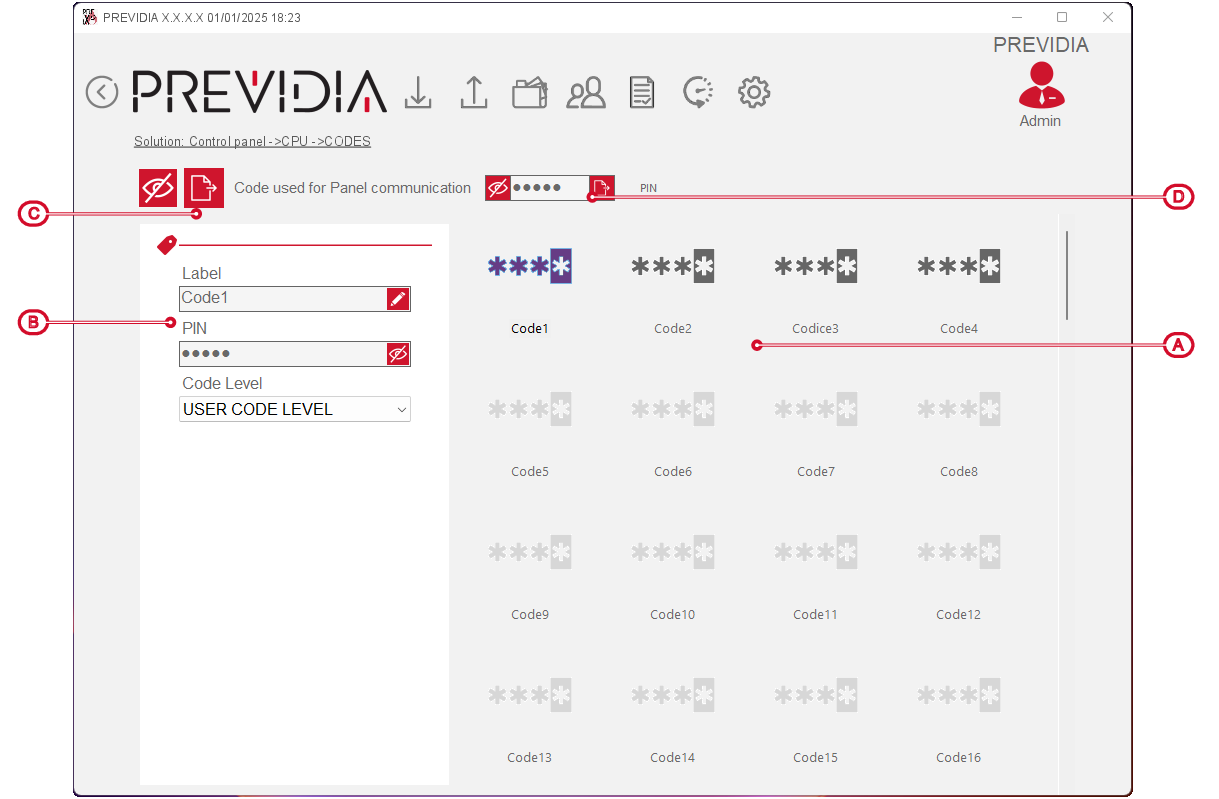
By clicking on a code icon, you can set the following parameters in the section on the left:
-
Label – description of the user associated with the code.
-
PIN – field where you can enter the PIN associated with the code.
-
Code level – field where you can select the access level of the user associated with the code.


The button next to view selection [C] allows you to set the codes programmed in this way on all the control panels of the open solution.
Software PIN
There is also a field [D] for entering the PIN to attribute to the Previdia/STUDIO software. This code defines the level of access of the software to the control panel. By default it is “0004”, therefore enabled for programming.
Also for this code, there is a button that allows you to set the programming in progress on all the control panels in the open solution.
