Equations
The programming of the Previdia system involves logical equations, that is well-defined conditions (for example, more than a defined number of alarms on a zone, a zone in alarm and an active timer, etc.) which, once verified, can influence the status of system elements (such as groups of outputs) or carry out specific actions.

In this equation programming section it is possible to view and set up to 256 equations:
|
|
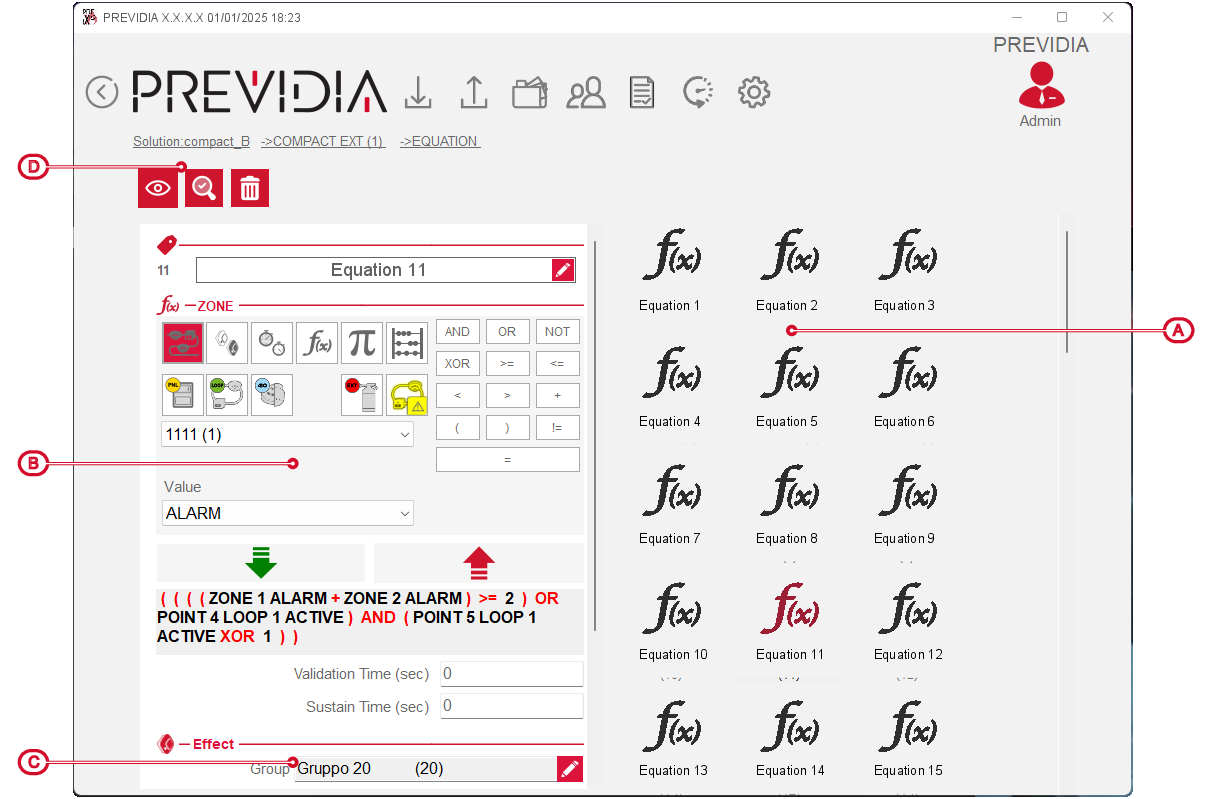
Programming the equation is possible through the following operations and parameters available in the section [B]:
-
Label – 20 character string that the control panel will use to identify the Equation.
-
Expression:
The logical expression of the equation must be completed with the various parameters which can have a value of “true” (or “1” or “active”, such as an event that has occurred) or “false” (or “0” or “not active”, such as a restored event).


These parameters, which can be selected in the appropriate fields and entered using the relative buttons, are elements of the system, in the status defined in the “Status” field:
- zones
- outputs group
- timer
- equations
- constants
- counters
- control panel
- loop
- loop points
- input
- outputs
- communicator
- extinction channel
- mathematical operators
-
The correctness of the completed expression can be verified with the buttons available at the top, which allow viewing and the examination of the expression of the selected equation.
-
Validation time – this is the time, in seconds, during which the set condition must remain true before the equation activates.
-
Minimum duration – by setting the minimum duration, the equation will still remain active for the set time, in seconds, even if the activation conditions cease.




Effect

The effect of the verified equation involves the following elements, available in the section [C]:
- Group, in – the fields allow you to select the groups of outputs which, once the equation is verified, change their activation status, switching to that indicated in the “In” box.
- Action on ON/OFF – these are the selection of actions recalled when the equation becomes true (ON) or returns false (OFF).
