Parameters of FPAMIAS

The “Logic” section of FPAMIAS module programming provides all the parameters and programming options of the module itself.
-
Label – 20 character string that identifies the control panel.
-
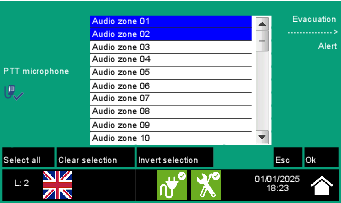
Areas to evacuate with button – button that opens a window where you can select the audio zones in which the evacuation message will be played after pressing the “Manual Emergency” and “Evacuation” buttons on the module.
-
Zones in alert with button – button that opens a window where you can select the audio zones in which the alert message will be played after pressing the “Manual Emergency” and “Alert” buttons on the module.
-
Zones to send announcement to – button that opens a window where you can select the audio zones to which the voice announcements are addressed via handset or Push-To-Talk.
-
Manual Emergency Help Screen – option that, if activated, in the event of a manual emergency, the module display will show the emergency procedure guide.
What is displayed in an emergency depends on the following options:
-
select elements to evacuate
-
audio zones list
-
zone selection
-
select audio sectors
-
select messages
-
-
Mute buzzer – option for muting the module buzzer.
-
End of emergency message – box where you can select the message to be played on the zones selected via “on zones” button after a rearm operation.
-
Do not unmute on new alarm – option that, if activated, does not undo muting when a second alarm occurs.
-
Mute if fire panel muted – option which, if activated, mutes the voice emergency panel even when the fire panel goes into mute mode.
-
PTT – option that enables fault reporting if Push-To-Talk is disconnected.
-
Synchronize time from FPMCPU – if activated, the time of the voice emergency panel synchronizes with that of the fire control panel.
-
Enable SD card – option that activates the SD card inserted inside the IFAMEVAC module.
-
MODBUS addresses – button that opens a window where you can select the MODBUS address of the control panels in the Hornet network
-
MODBUS TCP disabled – option that, if activated, disables the MODBUS protocol over TCP-IP