Devices that activate the group/activated by the group
By double clicking on the output group icon you access the section where you can associate devices, equations or evacuation operations to the group:
|
|
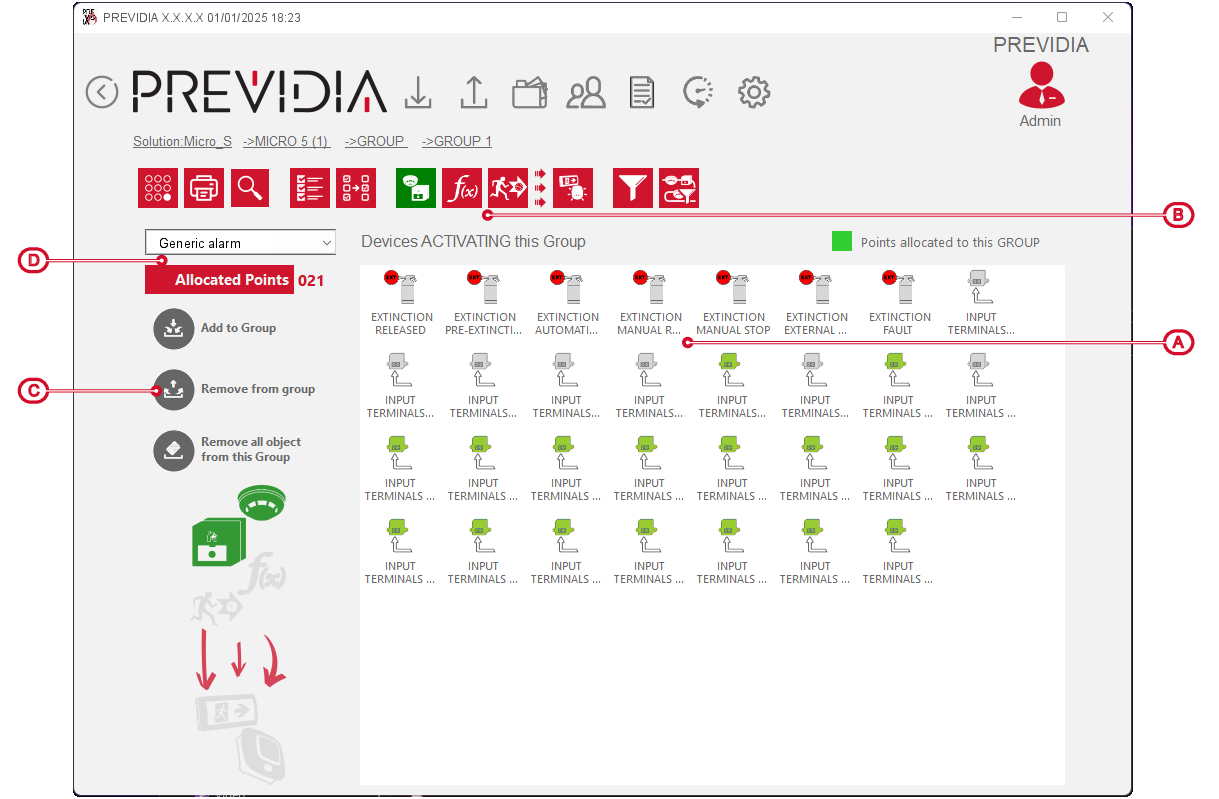
The list in the main section shows all system elements (devices, equations, evacuation matrices) available for assignment to the group with all their details, whether they are to be assigned to the group or assignable.
The buttons for the visualization allow you to navigate and select items more easily. Alongside the recurring buttons, you will find the following:
|
Devices that activate |
|
Button to view in the list below all the devices that can activate the group |
|
Equation |
|
Button to view in the list below all the equations that can activate the group |
|
Evacuation |
|
Button to view in the list below evacuations that can be activated via the control panel button |
|
Activated by the group |
|
Button to view in the list below the devices that can be activated by the group |




The elements marked with the green colour are those already assigned to the group.
To change the assignment status of these elements, you need to select them and then use the buttons on the left.
|
Add |
|
Button to assign the selected item in the displayed list to the group |
|
Remove |
|
Button to remove from the group the assignment of the selected item in the displayed list |
|
Remove all |
|
Button to remove from the group the assignment of all items in the displayed list |



The “Assigned points” indication keeps track of the total number of items assigned to the group.
