Fire system output groups
Each output can be associated with one or more output groups, a software engine that can activate the various outputs of the fire system in response to the various events and conditions that occur in the control panel.
The output activates when at least one of the output groups to which it belongs is activated.
An output associated with a specific output group goes into stand-by status if all input points assigned to the output group concerned are in stand-by status.
An output goes into warning, pre-alarm or alarm status, if at least one of the input points assigned to the output group concerned is in warning status or, respectively, in pre-alarm or alarm status.

Programming of output groups can be accessed via the respective button. In this section you can view and set up as many as 1000 output groups:
|
|
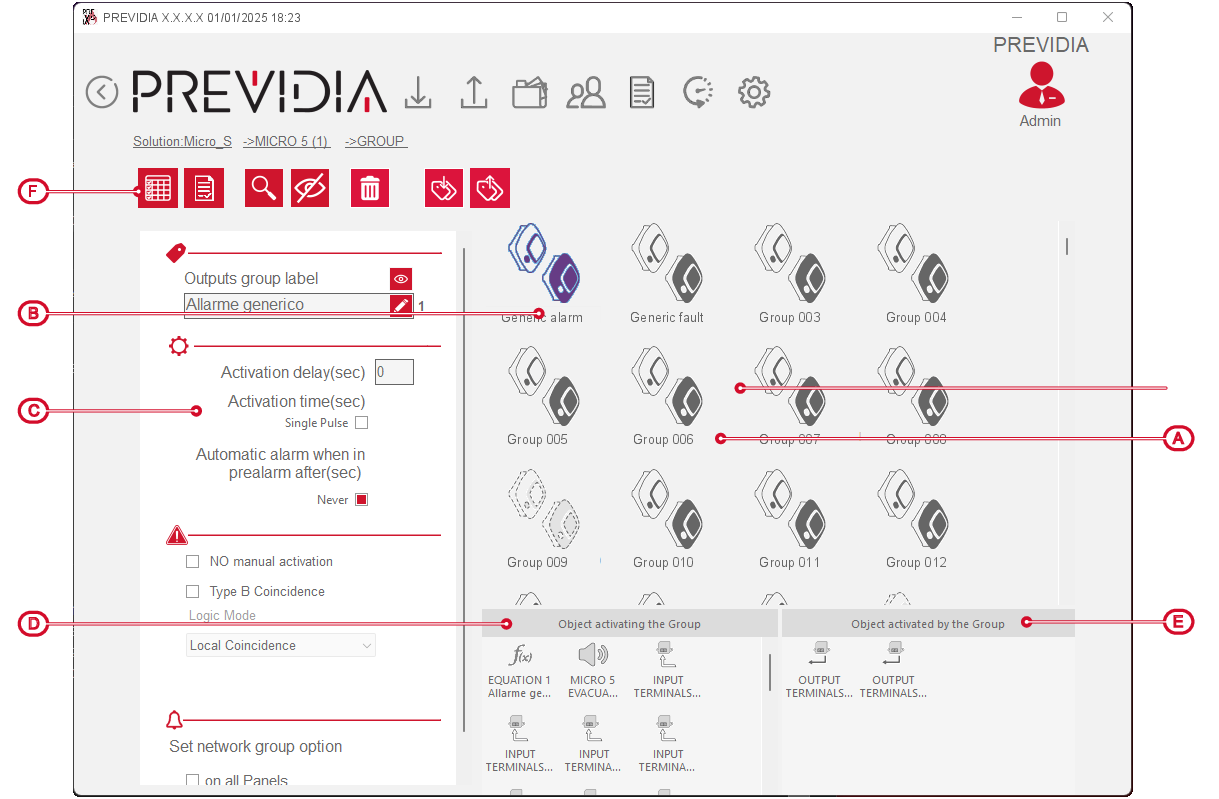
In this section you can select a single group of outputs by clicking the mouse. In conjunction with this selection, the software allows you to program and view:
- Fire system devices that activate the selected output group
- Fire system devices activated by the selected output group
- Parameters of the selected output group
The bar with the buttons for the visualization [F] also provides other functions for a detailed view of the integrations of the selected group with other elements in the system:
|
See assignments |
|
Button to access the section for viewing the fire system elements involved in the programming of the selected group |
|
EVAC |
|
Button to access the section for associating audio zones of the voice emergency system |
|
Import/Export label |
|
Buttons to import/export the description of the selected item |