Programming of the IFAMAMP amplifier module
|
|
||||||||||||
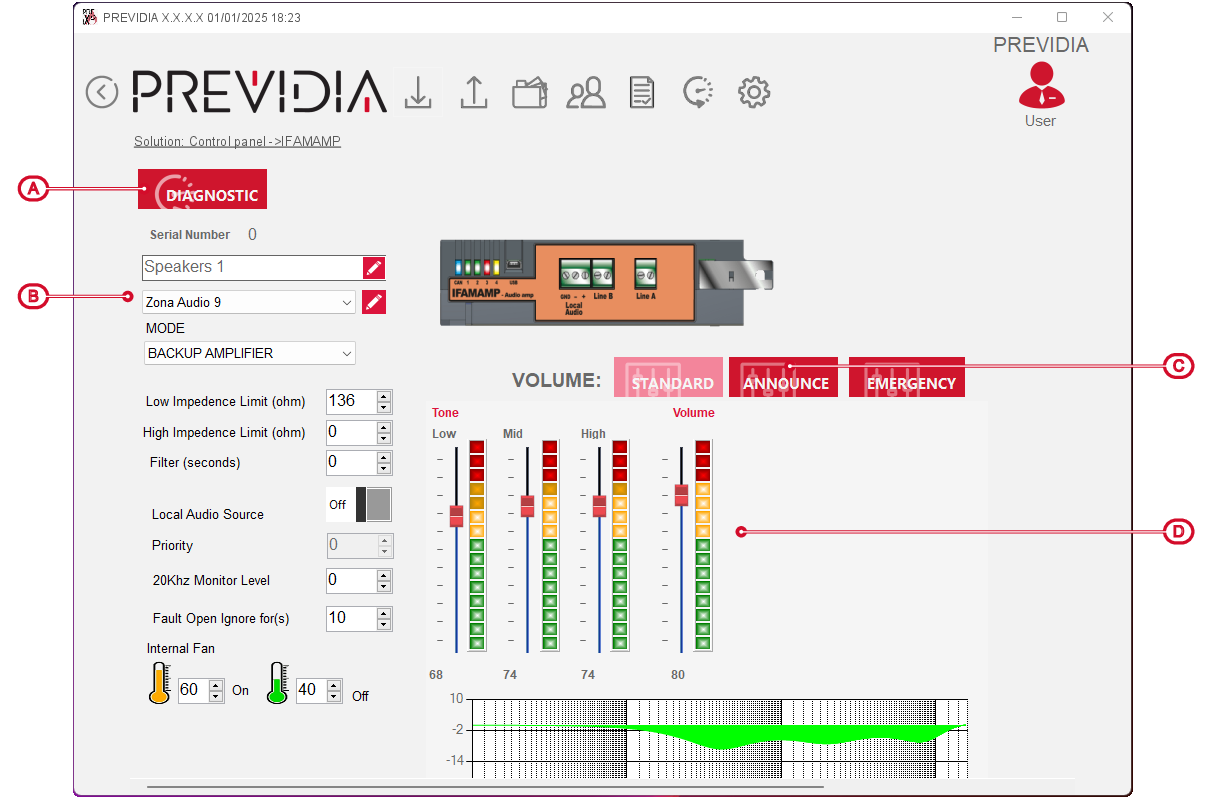

The button for Diagnostics [A] opens a window that, after a direct connection with the control panel via the  button, shows the readings of the following module parameters:
-
booster temperature (°C)
-
temperature of the speaker lines “LINE A” and “LINE B” (°C)
-
impedance on speaker lines (Ohm)
-
power supply (mV)
-
consumption (mA)
The available parameters are as follows:
-
Serial number
-
Label – 20 character string that identifies the module.
-
Associated audio zone
-
Configuration – to be selected in the field from the following operating modes of the IFAMAMP module, based on the speaker line module connections:
-
Backup amplifier – no connection, with this mode the module being programmed has the backup function of an eventual IFAMAMP module installed in the same CAN drive bar, which stops working
-
Drive only A/B line – in the case of a single line connection on “LINE A”/“LINE B”
-
Double line A - B – in the case of a double line connection
-
Speaker loop – in the case of a loop circuit
-
Disconnected lines – no connection on “LINE A” and “LINE B” speaker lines
-
-
Low/High impedance fault – fields for the impedance value on the lines in Ohm, below/above which the control panel will signal a fault.
-
Filter – field for the time, in seconds, that the control panel must wait before reporting the line impedance fault.
-
Local audio source – option to activate (“ON”) the source of the “Local audio” IFAMAMP module.
In such a case, in the “Priority” field for the priority level that this source has with respect to other audio sources.
-
20Khz Monitor Level – field for the voltage, up to a maximum of 20 Volts, of the driver tone used for the speaker lines.
-
Ignore open fault for – field for the time, in seconds, that the control panel must wait before reporting the open-line fault.
-
Internal fan – fields for the temperatures, in °C, for starting and stopping the fan the IFAMAMP is equipped with.

Volumes

Every IFAMAMP module allows the settings of three volumes for the output audio signals, which refer to three different emergency signalling modes of the control panel:
-
Standard – this is the audio volume relative to standard operation of the control panel, when there are no emergencies in progress (Public Addressing).
-
Announcements – this is the volume used when voice messages are played from microphone bases or similar for non-emergency announcements.
-
Emergency – this is the volume used when voice messages or announcements are played during emergency conditions.
For each volume you can select the relative level and sound equalization using the bars below.
