Telephone communicator module actions

The telephone communicator actions that are activated when certain events occur are:
-
sending of data with one of the protocols used by the communicator
The recipients of sent data are to be selected from the contacts address book, and it is the type of contact that conditions the type of action.
The software provides the “Actions” subsection with a matrix where you can add actions and associate them with contacts:
|
|
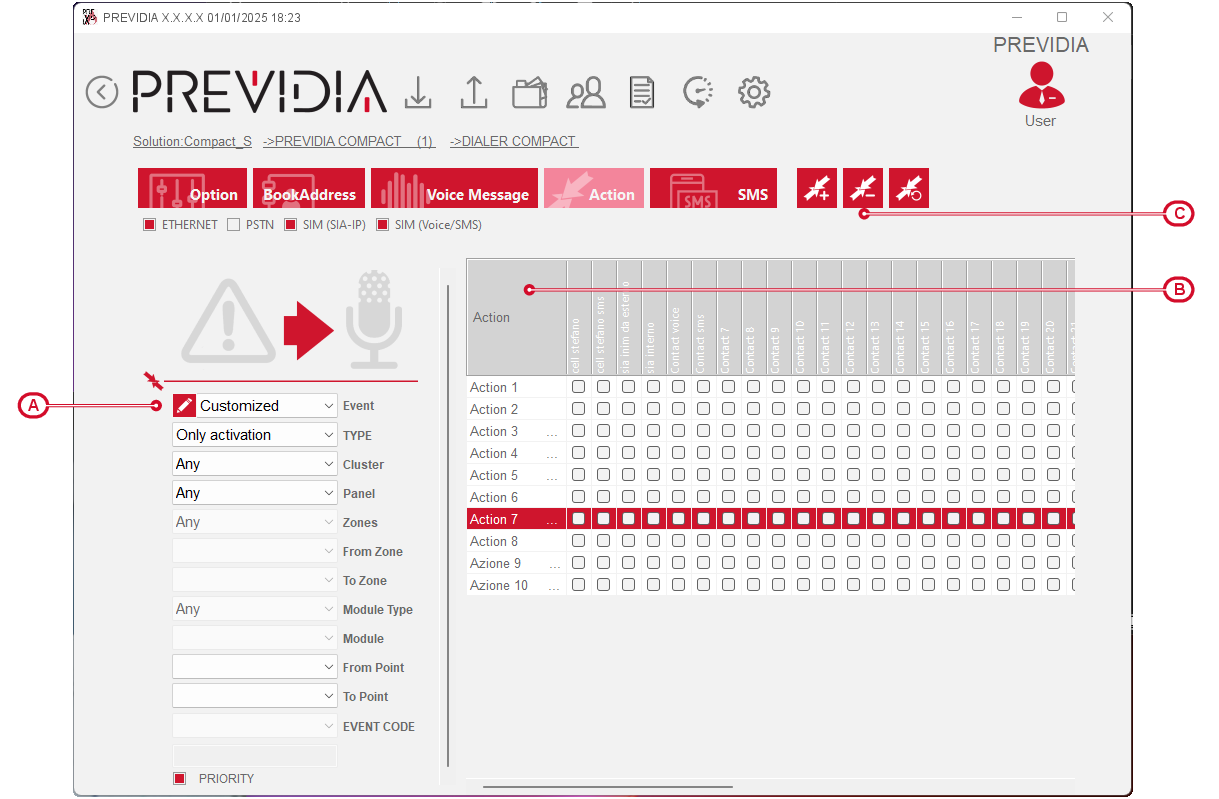
Each row of the matrix represents an action, added using the appropriate button [C]. By clicking on it, you can associate contacts by means of the relevant checkboxes.
The cause of the selected action, upon the occurrence of which communications to the contacts are started, can be programmed in the section on the left:
-
Event – via this checkbox you can choose the type of event that will trigger the action.
-
Type – the action can be triggered on activation, on reset, or on both phases of the event.
-
Customized event – clicking on the icon opens a window where you can make a multiple selection of events.
-
Cluster, Control panel, Zone, Module, Point – checkboxes of the devices subject to the selected event.
-
Event code – the SIA-IP code that is associated with the action during data sending.
-
Priority – option that, if selected, allows you to select a priority level, depending on the protocol used for the action contacts.
-
In the action management bar there is a specific button to delete any settings for the selected action.
-
Msg, SMS – fields of the matrix [B] where you can select the voice or SMS message from those available in the appropriate sections