Management of audio files
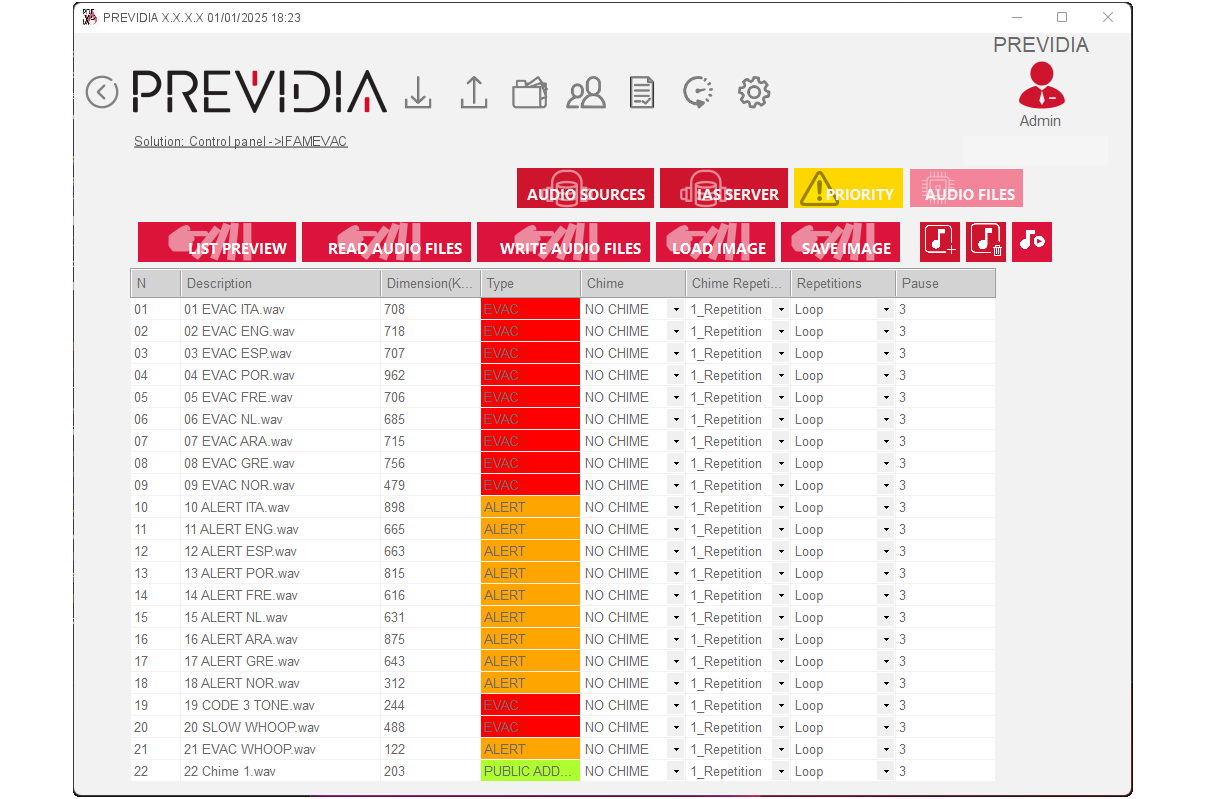
Management of audio files for use by the Previdia voice emergency system is achieved through the “Priority”, “Audio files” and “SD card” sections available on the IFAMEVAC module programming page.
In each of these sections the available files are listed in a table and for each of them it is possible to set parameters depending on the section you are in.
Parameters of the message
|
Parameter |
Editable from the section |
|||
|---|---|---|---|---|
|
Priority |
Audio files |
SD card |
||
|
No. |
Position in the displayed list |
- | - | - |
| Description |
Name of the audio file or its label, if set |
- | - | - |
| Size |
Size in KBytes of the audio file |
- | - | - |
| Type |
File type, as indicated during file upload |
- | - | - |
| Priority |
File priority, so as to instruct the system as to which file to play from the various audio streams in progress |

|
- | - |
| Type |
File type, as indicated during file upload |
- |
|
|
| Chime |
Name of audio file to use as bell, file playback intro message |
- |
|
|
| No. of chime repetitions |
Number of “chime” message repetitions before the message |
- |
|
|
| No. of repetitions |
Number of message repetitions |
- |
|
|
| Pause |
Time, in seconds, of silence after the single playback of the message |
- |
|
|
The file type, which must be indicated during file upload (see below), must be selected from the following:
-
EVAC – evacuation message to be played following activation by an authorized operator or the fire prevention system
-
Alert – alert message intended for the end users of the protected area
-
Alert staff – alert message intended for operational personnel within the protected area
-
Chime – introduction message of a sound message (“bell”)
-
Announcements/Music – non-emergency files, intended for public announcements or entertainment
Buttons for management
The “Audio files” and “SD-card” sections have a top bar with the following function buttons:
|
Buttons |
available in the section |
||
|---|---|---|---|
|
Audio files |
SD card |
||
|
List preview |
Allows a reading that returns only the names and descriptions of the files contained in the IFAMEVAC module memory or the SD card inserted in the module. |
|
|
| Read audio files |
This button allows reading of all files, with all related parameters, contained in the IFAMEVAC module memory or the SD card inserted in the module. |
|
|
| Write audio files |
Button for writing all the files visualized in the table with their relative parameters and changes to the memory of the IFAMEVAC module or the SD card inserted in the module. |
|
|
| Load/Save memory image |
Buttons for loading from PC or saving to PC the files displayed in the table. |
|
- |
|
|
Button to upload a file to the displayed list The loading process done via a window which requests the following for the new file selected:
The window also provides the available and occupied memory space. |
|
|

|
Button to delete the selected file from the list |
|
|
 , ,  |
Buttons to play and stop the selected file via the PC in use |
|
|

|
Button to write the message that will be used to run a “STIPA” test. |
|
- |

Warning
The file reading and writing operations are performed via the Ethernet connection of the IFAMEVAC module undergoing programming.
These operations are therefore direct, and do not involve reading or writing operations of the entire control panel, which would require longer times.
