Inim Cloud service
The programming parameters of the Inim Electronics Cloud service and the events involved can be reached through the following sections:
for Previdia Max and Previdia Ultra

Access the subsection contained in the programming section of the IFMLAN module.
for Previdia Compact and Previdia Micro

Access the section of programming of the control panel and click on the Cloud programming button.
|
|
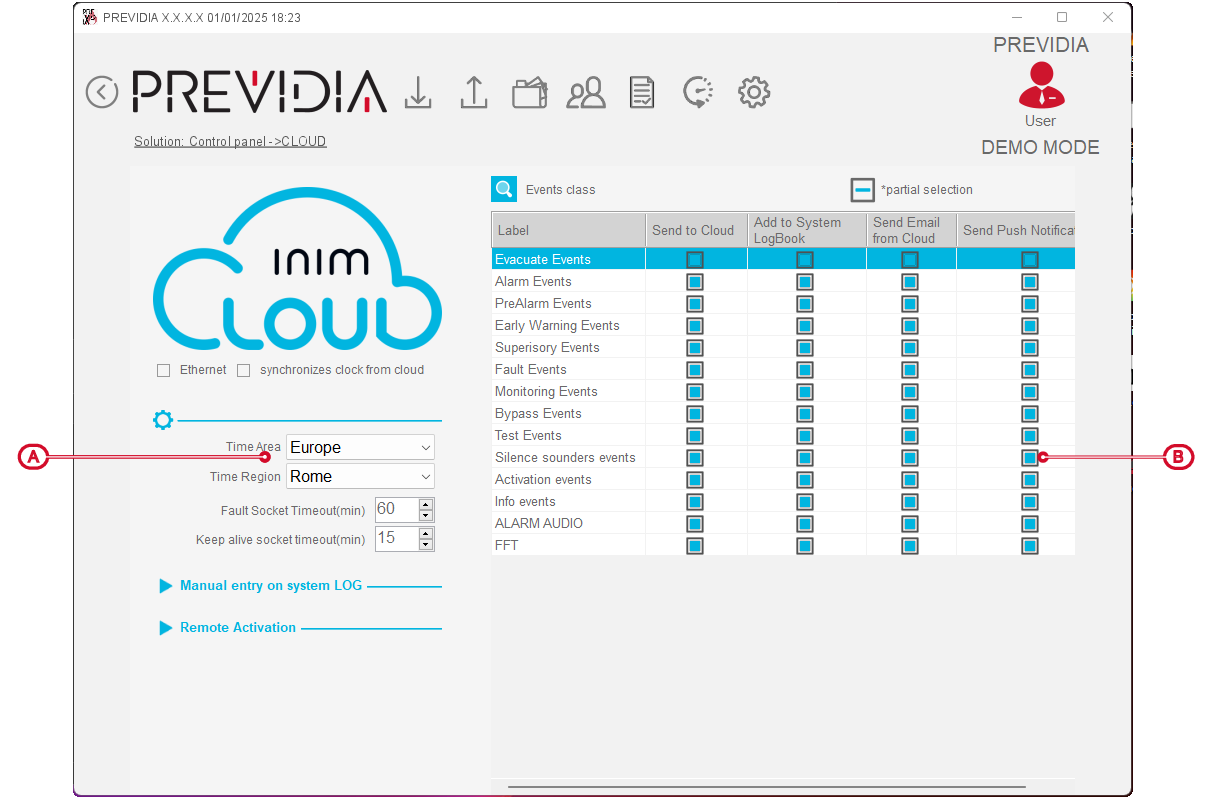
Options
-
Ethernet – option that enables the Cloud service via Ethernet line (on board for Previdia Compact and Previdia Micro, and through the IFMLANmodule for the Previdia Max and Previdia Ultra).
-
Sync clock from Cloud – if enabled, this option sets the date and time of the control panel, synchronizing it with the Cloud date and time
-
Use backup ports – if enabled, uses TCP ports 505/506 to connect to the Cloud instead of the default ports 110/143 (only for Previdia Compact and Previdia Micro).
-
Time area/region – time zone selection fields
-
Fault socket timeout – field where you can express, in minutes, the delay before generating the “Ethernet Fault – Cloud” event in the control panel in the event of connection loss with the Cloud by the control panel.
-
Keep alive socket timeout – field to indicate, in minutes, the delay between a supervision signal from the Cloud before retrying the Cloud connection.
-
Manual addition to the installation register – listed are the following event types generated directly from the Cloud, which must be logged in the system register.
- customized
- training
- non-conformity
- drill / evacuation
- maintenance
-
Enable from remote – selection of control panel functions that can be activated remotely via the Cloud:
- rearm
- mute / release
- disablements
- test
- bypass communicators
- bypass extinction
- manual activations

Selection of the events
The events to be selected are listed, so that, if they occur, the control panel can:
-
send the event to the Cloud
-
log the event in the installation register
-
send event notification via email
-
send push notification of the event

The button at the top allows you to view all events or group them into categories.
