Display of the FPAMIAS module

The “Display” section of FPAMIAS module programming allows customization of the display home page when the control panel is in stand-by status. This feature allows you to insert objects related to the status of elements of the voice emergency system, such as images, customized function buttons or labels.
|
|
||||||||||||||||||
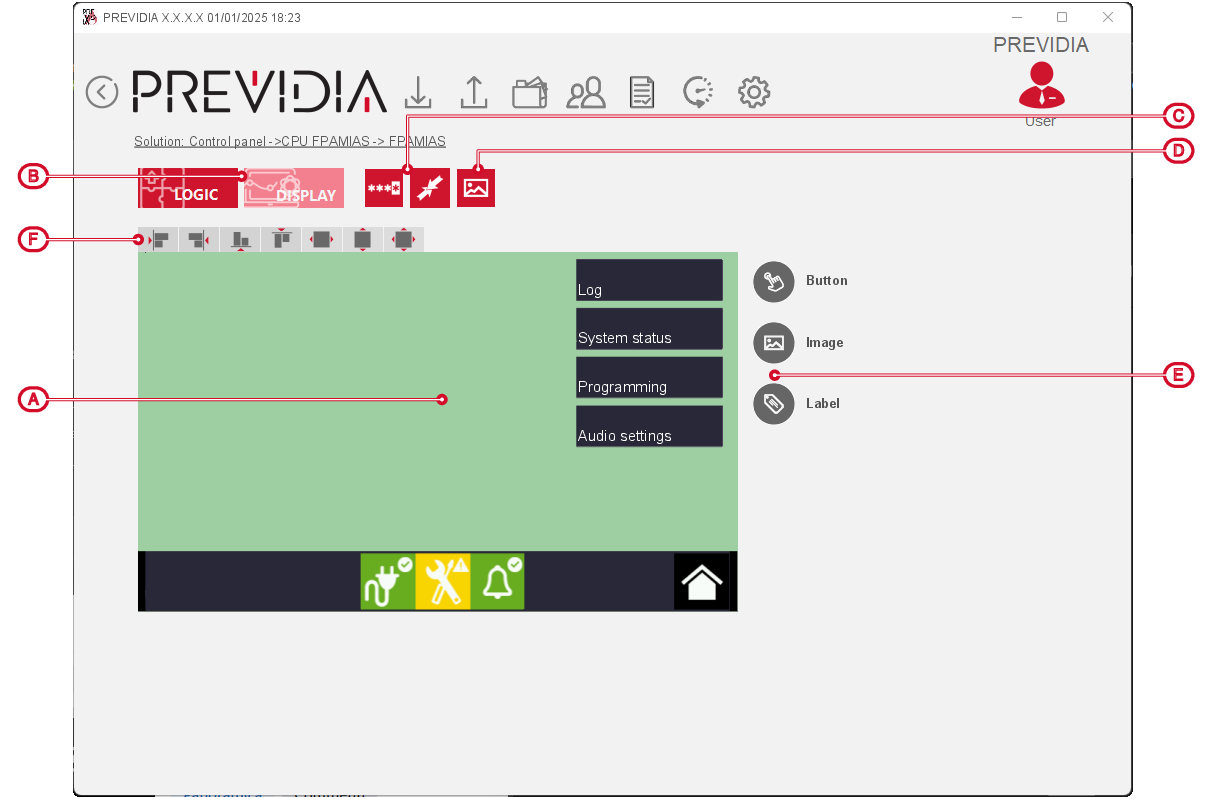
Inserting an object is done by clicking on the respective icon on the bar on the right [E] and then clicking on the point on the display image where you wish to position it.
By selecting multiple icons, using the available buttons [E] you can align them or change their size by giving them the size of the first selected icon (width, height or both).
Left-clicking on one of the icons on the display highlights the icon and displays a frame which will allow you resize or reposition it.
Right-clicking on one of the icons on the display will allow you to remove the object or change its settings via the window that opens.
Button

The editable settings window provides:
-
button label
-
position and size (in pixels)
-
associated action, with further setting of the related parameters (label, cluster, control panel, command)
-
minimum access level required
Images

The editable settings window provides:
-
position and size (in pixels)
-
selection of the image file (“Image Off”)
-
selection of the “fixed” or “conditioned” type; the conditioned image requires further settings regarding the image change (from “Image Off” to “Image On”, to be selected) which takes place when an event occurs, to be indicated with the available parameters (control panel, filters, modules relating to the event)
Label

The editable settings window provides:
-
text shown on the label
-
position and size (in pixels)
-
text size and colour
