Voice evacuation systems
The Previdia control panels are also capable of managing voice evacuation systems (“Voice Evac”) that are not made by Inim Electronics. Among these are:
-
Tutondo
-
Paso
-
Vivaldi

The configuration of these systems is implemented inside the module for the LAN interfaces of the control panels (IFMLAN for Previdia Max and Previdia Ultra, PREVIDIA-C-COM for Previdia Compact and Previdia Micro). Through these sections, it is possible to configure up to 255 evacuation zones as outputs for which alert and evacuation messages can be activated.
|
|
 button shows the connection to be made.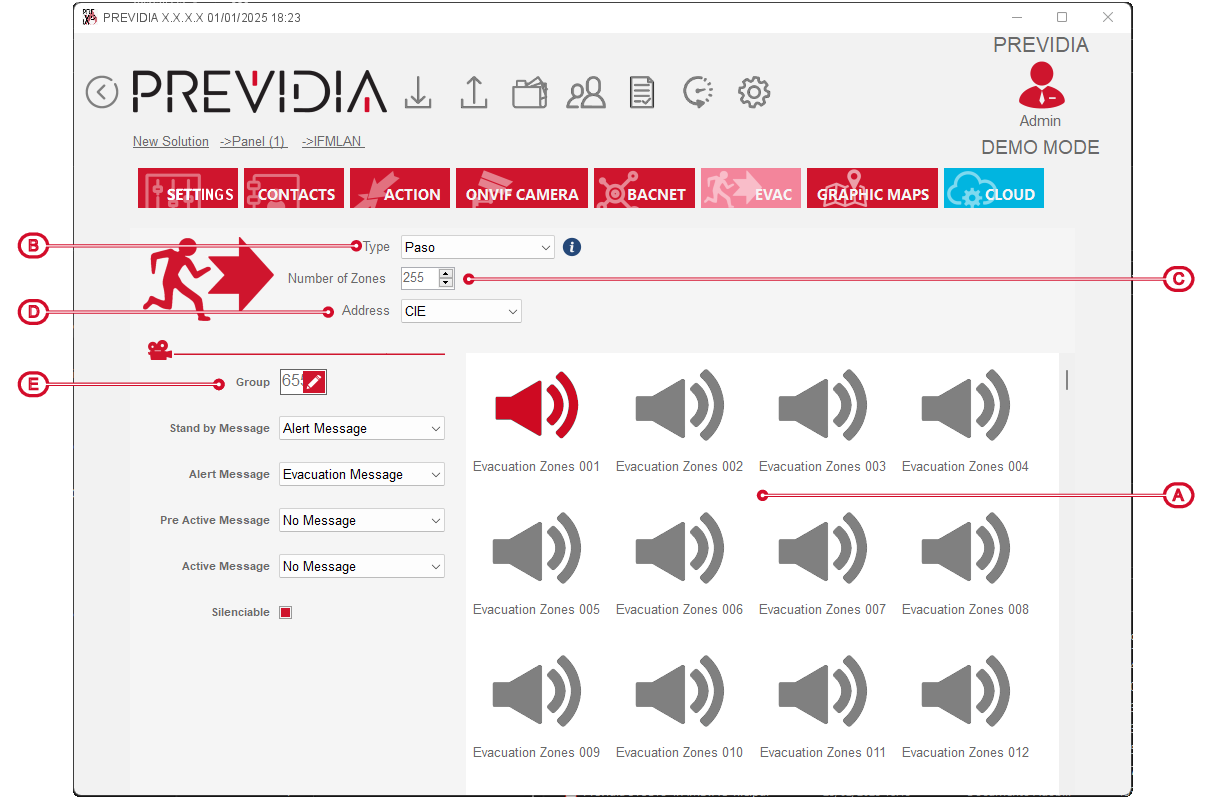
For each zone selected from the list of added zones, the following parameters can be configured:
-
Group – button that opens the window where it is possible to indicate the output groups the evacuation zone belongs to.
-
Message for ... – fields where it is possible to select a message for each status signal (stand-by/alert/pre-active/active).
-
Silenceable – option that makes the evacuation zone silenceable.