Mixer
The programming section of the FPAMIAS module provides an audio mixer.
From this section of the software it is possible to correlate the audio input and audio output signals and adjust their volumes and equalization.
|
|
Sources
The audio sources of the Previdia audio system are divided into external sources, coming from the outputs of IFAMAMP modules of control panels connected to the control panel undergoing programming via the IDANet network, and internal sources, coming from the installed IFAMEVAC modules, IFAMFFT and Push-To-talk or telephone handset.
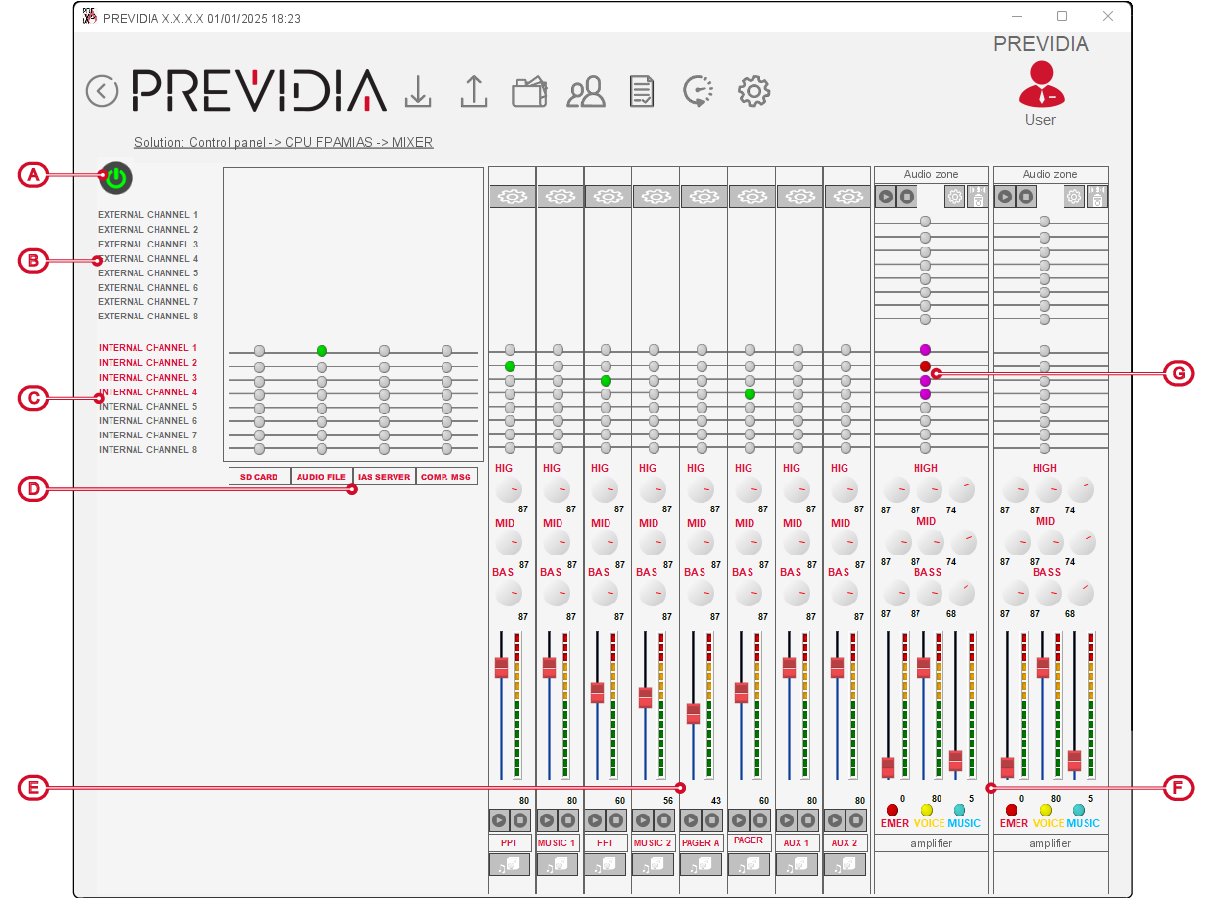
By clicking on an item in the source channel lists on the left [B, C], the information regarding the source will be displayed at the top.
To the right of the items of the internal channels is a series of LEDs that indicate which of the internal playback sources occupies the channel. In this case the light turns green instead of grey.
For each of the first 4 sources on the left (SD card, audio file, IAS server, composed messages, [D]), the mixer provides a button for setting the playback priority of the elements available and the playback buttons.

For each of the other sources [E], the mixer has a specific section for adjusting the equalization and volume of the sound, either via knob icons or the button at the top.



It is possible to start or stop playback of internal sources via the relative buttons. Playback occurs on all audio zones selected via the list shown after clicking the appropriate button.
Amplifiers
On the right [F] the mixer shows the output channels, with as many sections as configured IFAMAMP modules placed side by side, identified by their description and the associated audio zone.
For each amplifier there are playback buttons, knob icons or button for adjusting the equalization and three volumes (standard, announcements and emergency), as described in the relative paragraph.
For each of the 16 audio sources, each amplifier has a LED that changes colour based on audio playback:
-
grey – source off
-
red – source playing, inaudible
-
purple – source playing, audible (highest priority source)

Each amplifier also has a button to start a “STIPA” measurement of the relative audio zone.
